Retyping line items from job cards at closing time
Invoices pull labor and parts from the repair order automatically — totals calculated for you
Car repair shop invoicing software
Create professional PDF invoices from completed repair orders — with labor, parts, taxes, and your branding — without a separate billing tool or duplicate data entry.
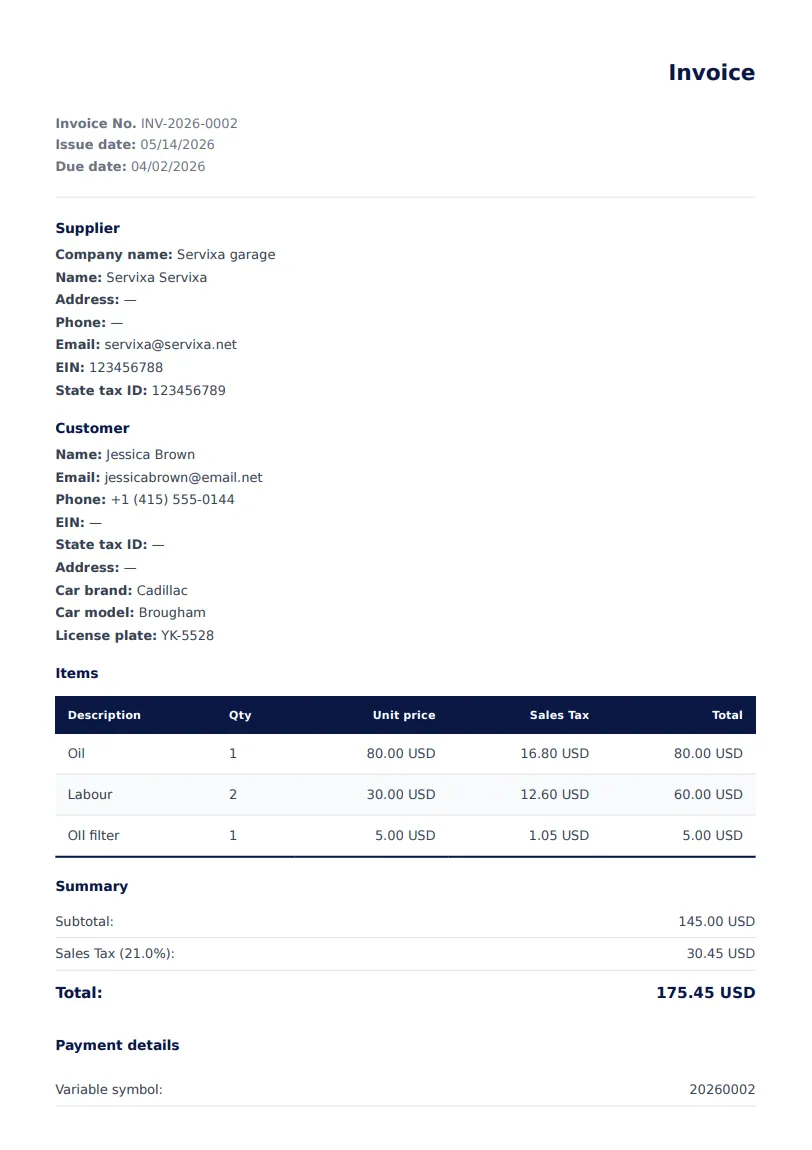
Servixa car repair shop invoicing software connects billing to the job you already logged on the floor.
Invoices pull labor and parts from the repair order automatically — totals calculated for you
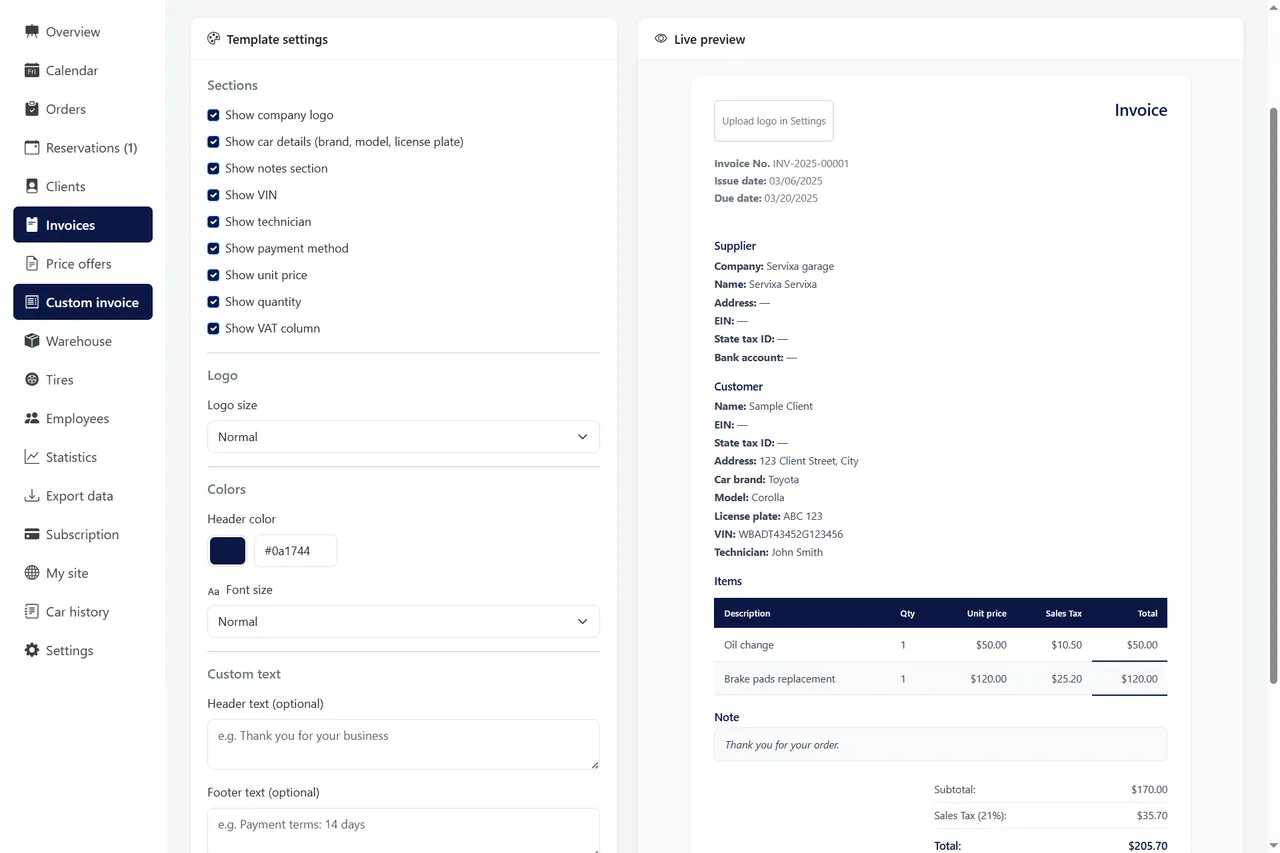
Branded PDFs with your shop details, tax labels, and clear line-item breakdowns
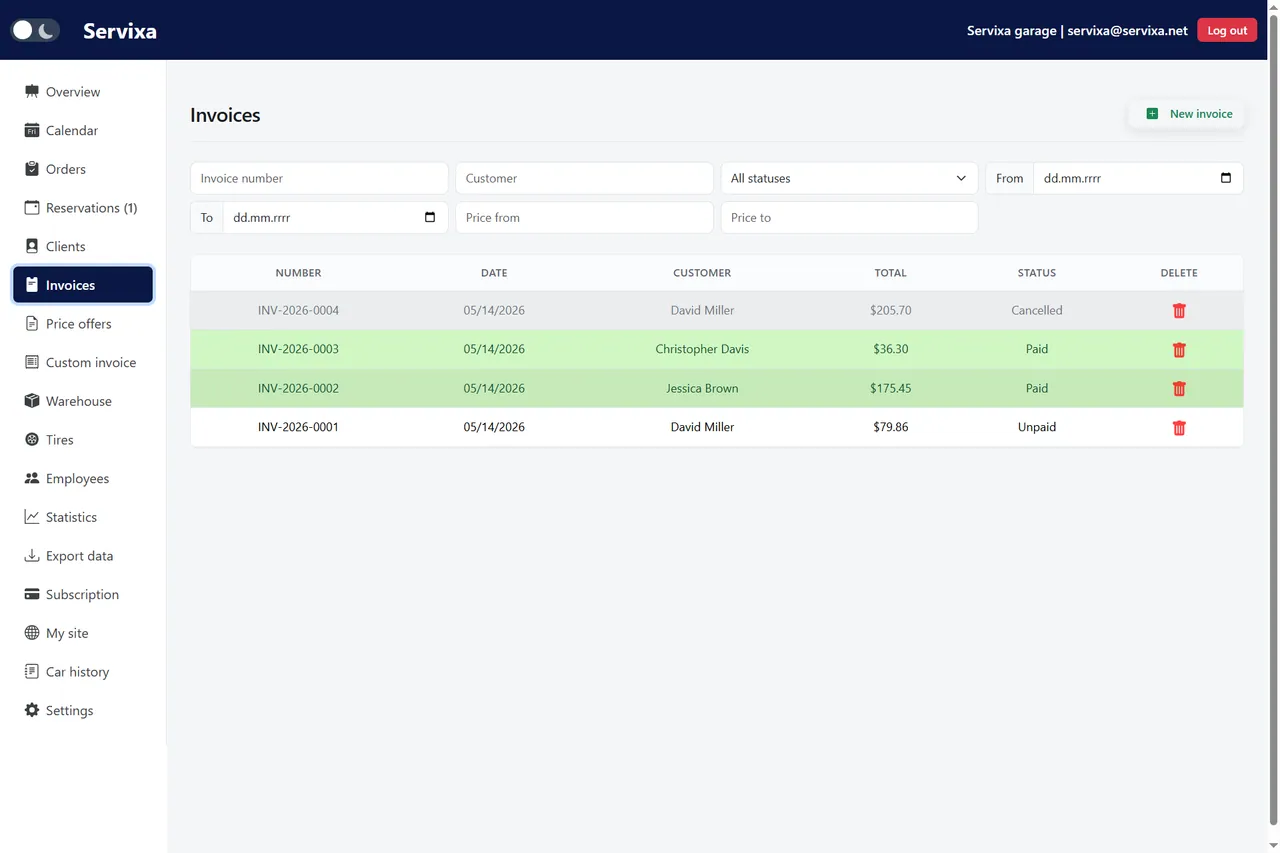
Invoice list with status tracking, due dates, and full customer history on one screen
Detailed line items linked to the repair order the customer authorized
A billing workflow built for how car repair shops actually close jobs.
Labor and parts are already on the work order — no separate tally sheet needed.
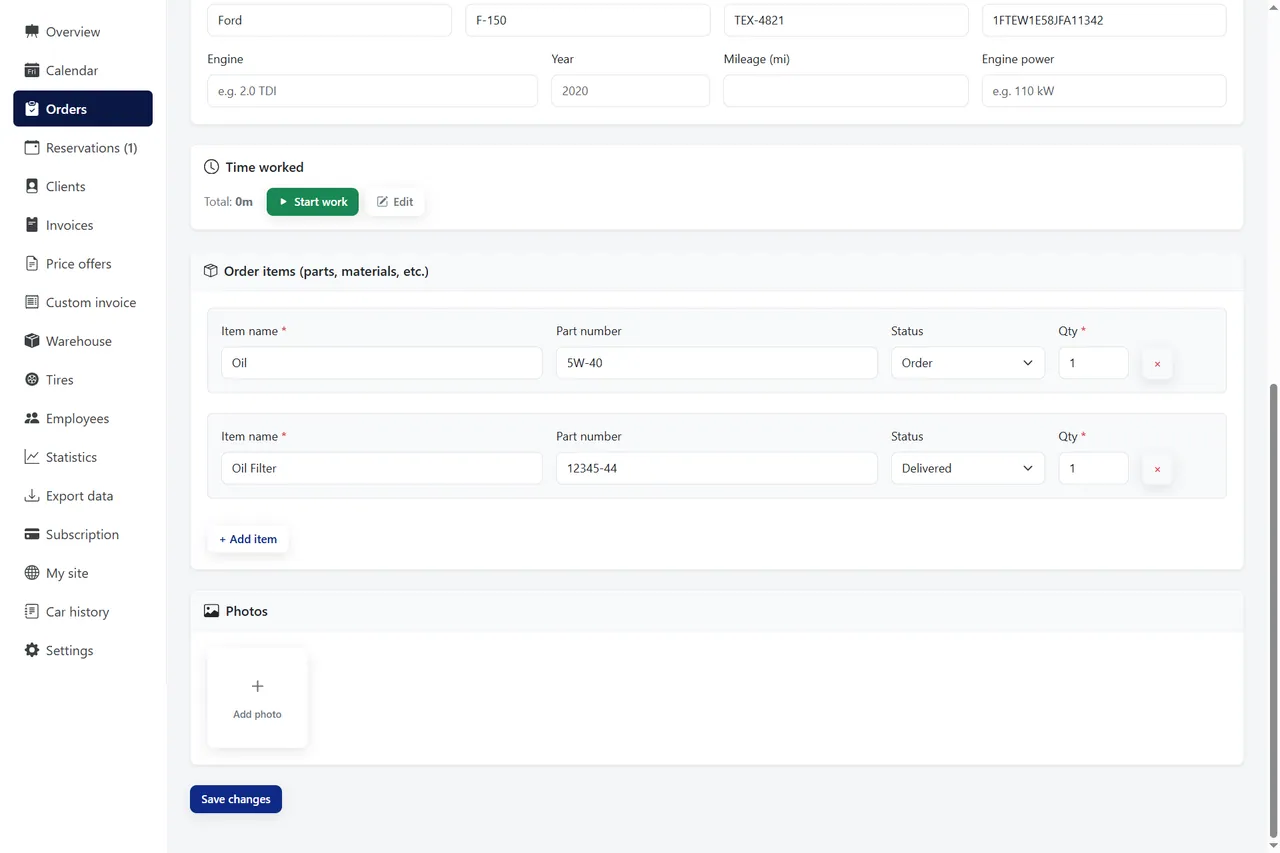
Totals, taxes, and currency settings apply automatically based on your shop configuration.
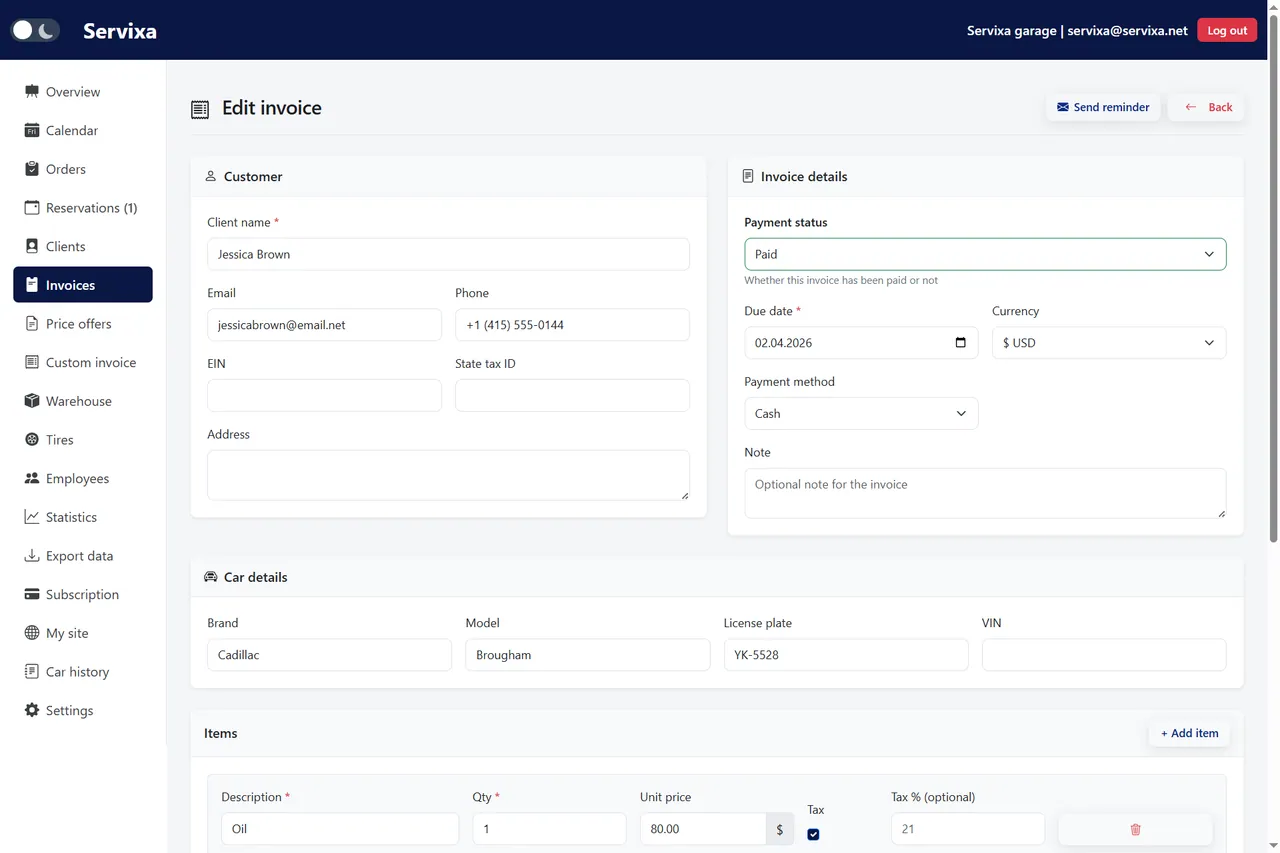
Adjust discounts, notes, or individual line items before sending — full control at the desk.
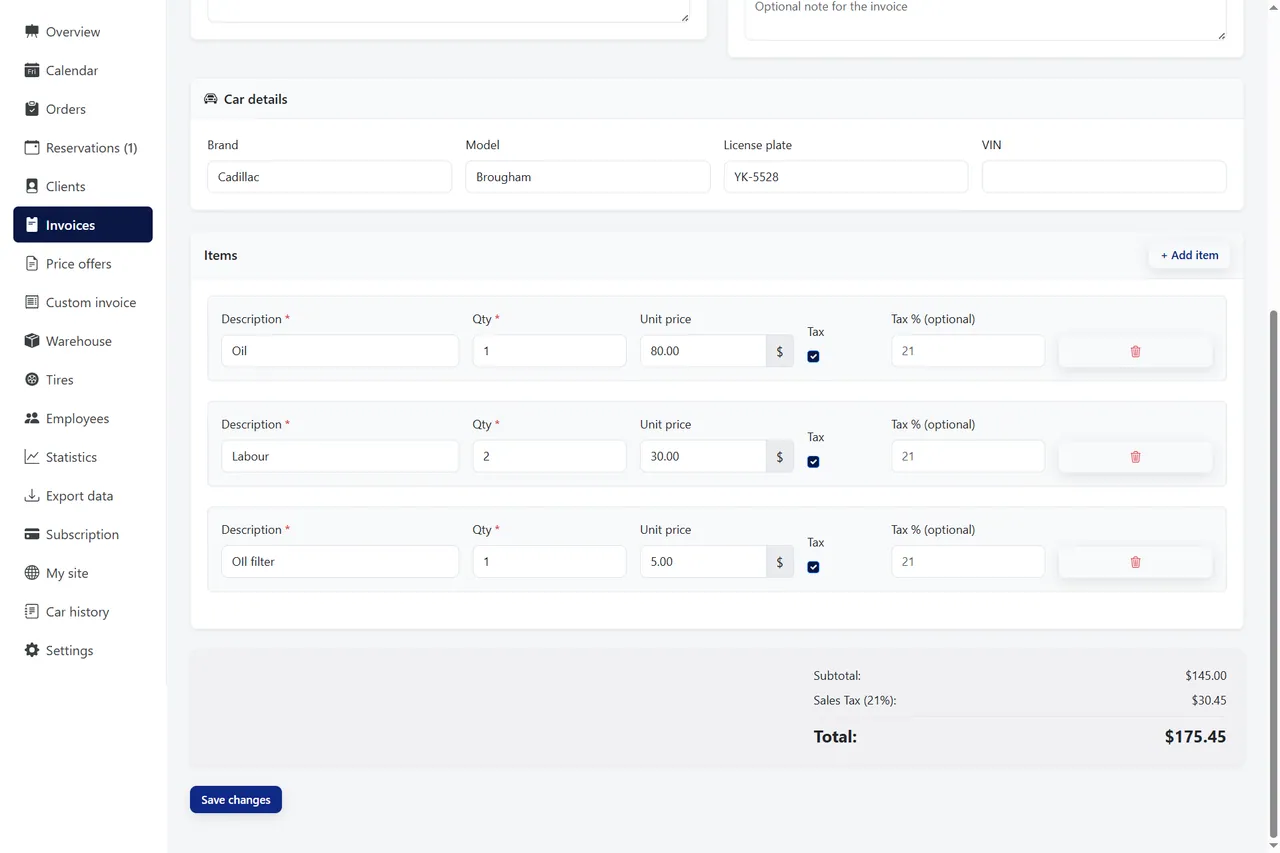
Email or print the invoice — history saved on the vehicle profile for next visit.
Invoice list, editor, and PDF output in one module.
Invoicing is where good workshop work either becomes revenue or becomes a dispute. Car repair shop invoicing software closes that gap by turning completed repair orders into accurate, branded bills — fast enough that you can invoice as jobs finish instead of rebuilding totals at midnight.
The most expensive invoicing mistake in a car repair shop is duplicate entry. A mechanic logs parts on a job card; at closing, a service writer types those same lines into a spreadsheet or generic accounting tool. Typos creep in. Quantities change. Customers question totals that do not match what they approved. Car repair shop invoicing software eliminates that gap by generating invoices directly from the repair order.
When billing lives in the same system as work orders, every charge has a trail. Labor hours, part numbers, and shop supplies appear as line items the customer can understand. If you need to adjust a discount or add a shop fee, you edit once and the PDF updates. Therefore, pickup conversations stay focused on the repair quality, not on reconciling numbers.
Servixa links invoices to client profiles and vehicle history automatically. Next time that customer calls, you see paid and unpaid invoices alongside past orders. For fleet accounts and repeat clients, that continuity builds trust and speeds up authorization on future jobs.
Customers judge professionalism partly by the document you hand them. A clear invoice with your logo, legal business name, tax identifiers, and itemized breakdown signals that your shop runs a tight operation. Conversely, a generic receipt or handwritten total invites scrutiny — especially on larger repairs.
Servixa car repair shop invoicing software produces print-ready PDFs with configurable templates. Set your currency, tax labels, and payment terms once in settings, and every invoice inherits those defaults. Country-aware presets help shops in Germany, the United States, Australia, and other regions format documents the way local customers expect.
Multi-currency support matters for shops near borders or serving international clients. Bill in EUR, USD, GBP, CAD, or AUD without maintaining separate templates. Export invoices for your accountant or use the data export module for period-end reporting — all from the same platform described on our features page.
Invoicing software is not just about creating PDFs — it is about knowing what you are owed. An invoice list with paid, unpaid, and overdue status gives owners a live picture of receivables without opening a spreadsheet. Filter by date range when preparing tax filings or reviewing monthly performance.
Because invoices tie to repair orders, disputed charges are easier to resolve. Pull up the original job, show the line items and photos, and align the bill with authorized work. That transparency reduces chargebacks and strengthens customer relationships over time.
Statistics module complements invoicing with revenue charts and order trends. See which services drive income, compare periods, and identify slow weeks before they become cash crunches. Together, invoicing and analytics give independent car repair shops enterprise-level visibility without enterprise-level complexity.
Not every job starts with a firm price. Oil changes might be flat-rate, but diagnostics and major repairs often need a quote first. Servixa separates price offers from invoices so you can send a structured quote, wait for customer approval, then convert the accepted offer into a repair order when work begins.
That workflow keeps estimates from accidentally becoming bills before the customer agrees. When the job completes, the invoice reflects what was actually done — including supplements approved along the way. Fleet managers and insurance-adjacent work especially benefit from this clear paper trail.
If your shop currently juggles quotes in email and invoices in a different app, consolidating in one car repair shop management platform removes friction at every handoff. Review pricing plans to find a tier that includes offers, orders, and invoicing together.
Changing billing tools sounds risky, but car repair shops switch successfully when they start with new jobs rather than migrating entire archives on day one. Servixa requires no desktop installation — configure your company profile, tax settings, and branding, then invoice the next completed repair digitally.
The 2-month free trial includes full invoicing features so you can run parallel with your current process briefly. Most shops find that one-click invoice generation from repair orders saves enough time on the first busy Saturday to justify the move. Training at the front desk typically takes less than an hour because the workflow mirrors what service writers already do — only faster.
Ready to bill professionally without retyping line items? Start your free trial from the signup page. No credit card is required, and you can explore features, pricing, and localization settings before inviting your team.
Compare pricing plans, browse the full feature list, read about Servixa, or contact our team for help choosing the right setup.
Bill as jobs finish — not hours after the shop closes.
Begin your 2-month trial