Lost or illegible job cards on busy days
Cloud work orders searchable by plate, customer, or status — nothing falls through the cracks
Repair order software
Create digital work orders, track every status, log parts and labor, and turn finished jobs into invoices — without retyping a single line.
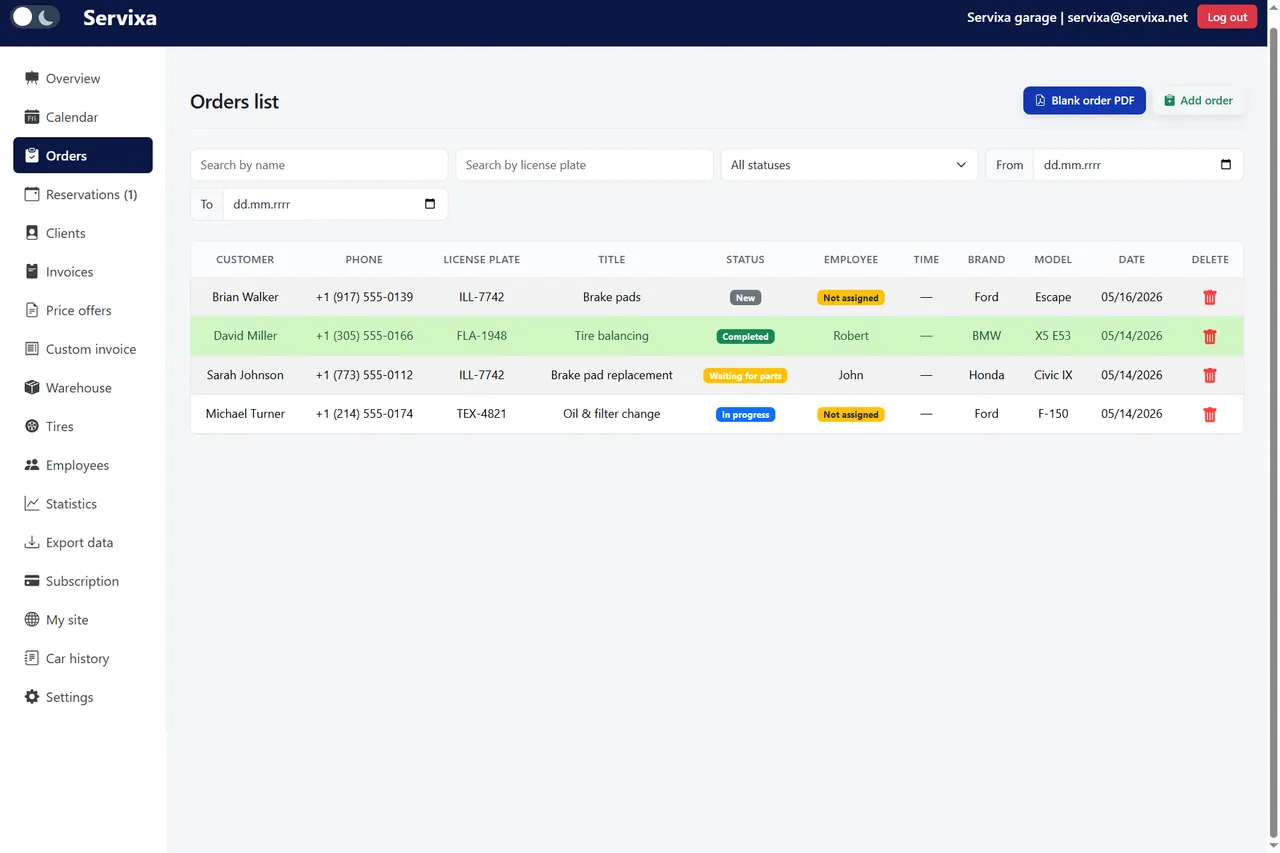
Servixa repair order software keeps every job digital, searchable, and connected to billing.
Cloud work orders searchable by plate, customer, or status — nothing falls through the cracks
Line items, time tracking, and photos on one repair order your whole team can see
Custom statuses — waiting, in progress, ready, completed — visible on the floor and at the desk
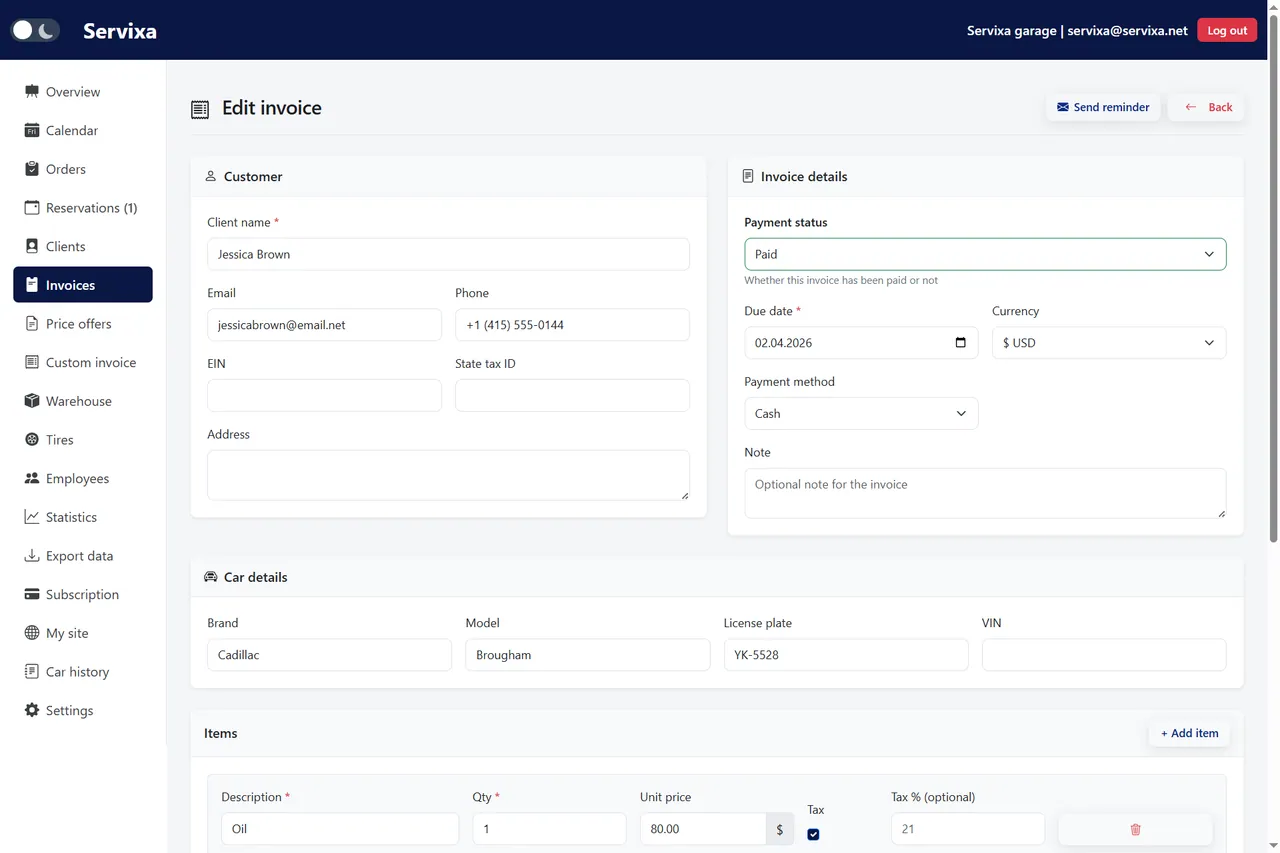
Generate professional invoices directly from the completed repair order in one click
From intake to invoice without duplicate entry.
Capture customer, vehicle, and complaint on one screen — or start from an existing client profile.
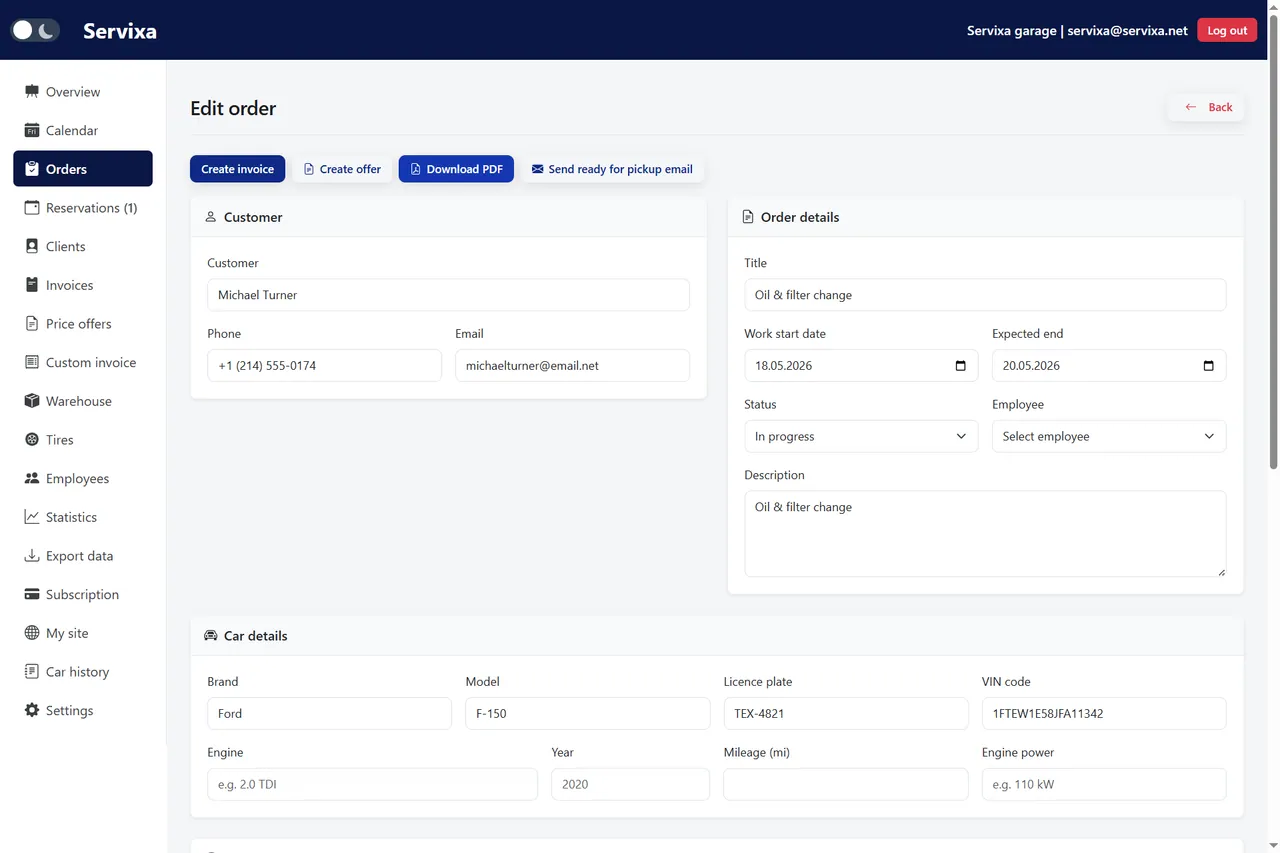
Record line items, quantities, technician time, and photos as the work progresses.
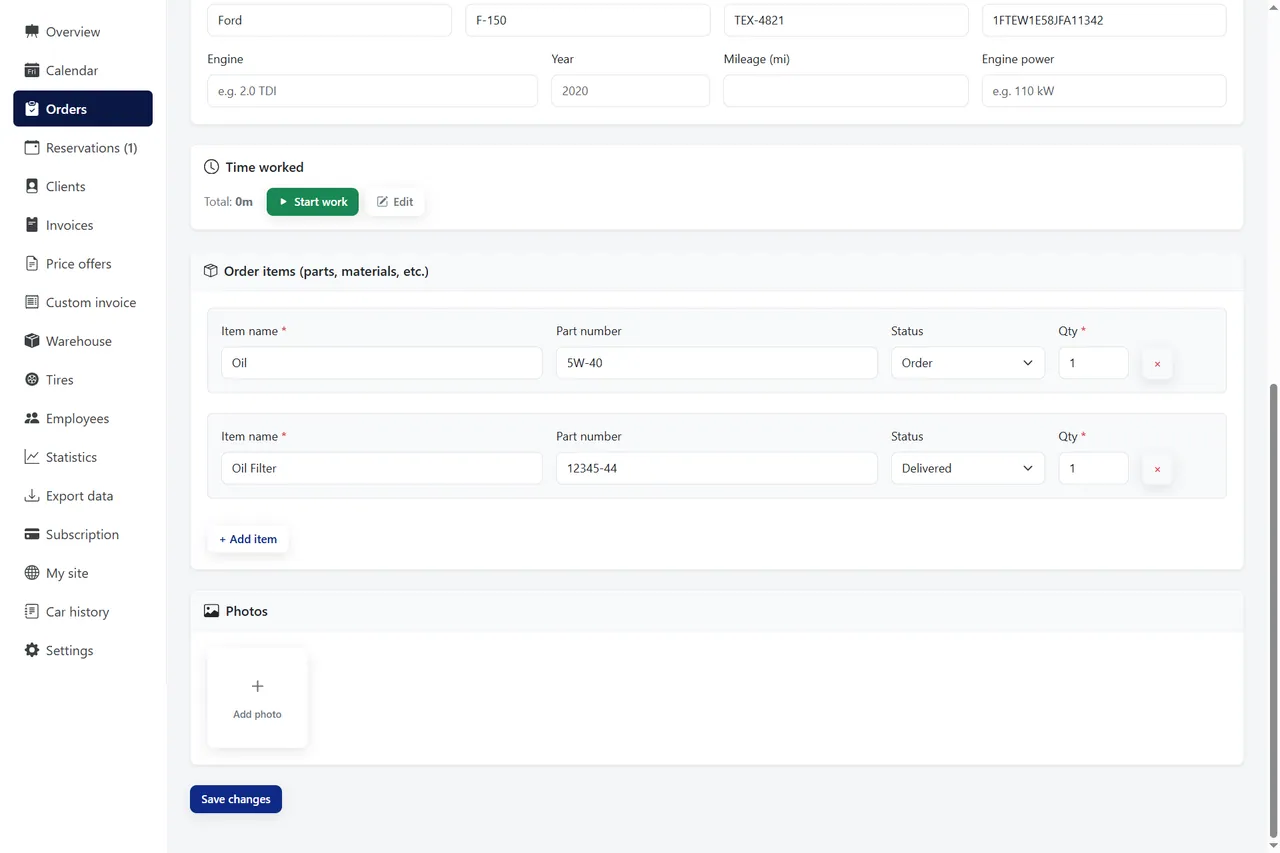
The whole team sees progress in real time — front desk, owner, and mechanics stay aligned.
One click from a completed job to a PDF invoice — totals carry over automatically.
Create, track, and close jobs digitally.
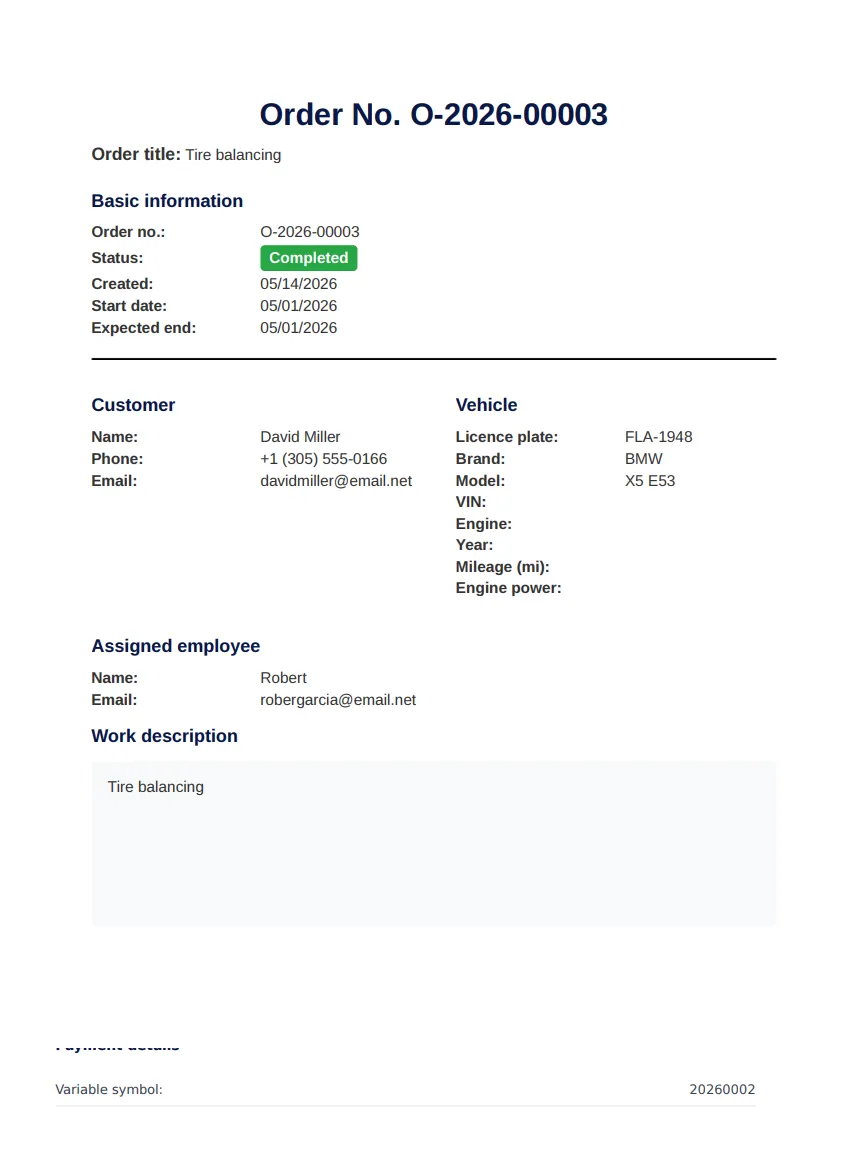
Paper job cards worked when shops were smaller and slower. Today, however, a busy bay generates dozens of moving parts — parts orders, technician notes, customer callbacks, and invoices that must match the work actually performed. Repair order software replaces that friction with a single digital record that everyone on your team can trust.
At its core, repair order software is a digital work order system built for automotive service. Instead of handwriting customer complaints on a clipboard, you open a job in the cloud, attach the vehicle and client, and build the repair record as the work happens. Every part added, every hour logged, and every photo uploaded stays on that order until the vehicle leaves your shop.
Unlike generic project tools, purpose-built repair order software understands how car repair shops operate. Statuses reflect real workshop language — waiting for approval, waiting for parts, in progress, ready for pickup. Line items separate labor from parts. Vehicle identifiers like plate and VIN sit next to mileage so the next visit starts with accurate context.
Servixa connects repair orders to the rest of your operation: client profiles, warehouse stock, calendar scheduling, and invoicing. That means you are not copying data between apps at the end of the day. Consequently, your team spends less time on admin and more time turning wrenches.
Paper feels cheap until you count what it costs. Illegible handwriting leads to wrong parts. Job cards get shuffled under keyboards or left in coat pockets. When a customer calls about status, someone walks the floor to find the car instead of checking a screen. Over a month, those minutes add up to lost revenue and frustrated customers.
Digital repair orders solve the findability problem. Search by license plate, customer name, or status and the job appears instantly. Technicians add notes from a tablet in the bay. The front desk sees the same record without shouting across the shop. Moreover, completed jobs never disappear — they become vehicle history for the next service visit.
Shops that switch to repair order software typically report fewer billing disputes because charges map directly to documented line items. Customers see a professional PDF tied to the work they approved. As a result, pickup conversations focus on the repair, not on deciphering a handwritten total.
Morning starts with scheduled jobs already in the system — either from online booking or walk-ins entered at the desk. Each repair order carries a planned date that appears on your workshop calendar, so you can balance bays before the first vehicle arrives. When a mechanic starts work, they update status and add findings without leaving the order screen.
If a part is needed, pull it from warehouse inventory directly into the line items. Stock levels adjust automatically, which prevents the common scenario where two jobs compete for the last filter on the shelf. When additional labor is required, add it to the same order rather than scribbling a supplement on a sticky note.
At completion, convert the repair order to an invoice without retyping. Totals, taxes, and line descriptions carry over. Send the PDF by email or print it at pickup. The order remains in history linked to the client and vehicle — ideal for warranty questions, fleet accounts, and repeat customers who expect you to remember what you did last time.
Not every work order tool fits a car repair shop. Look for photo attachments so technicians can document damage, wear, or completed work — especially useful when customers authorize repairs remotely. Time and labor tracking should be native to the order, not a separate spreadsheet your service writer maintains at closing.
Status workflows must be flexible. A four-bay independent shop and a tire-focused business use different stages, so you need statuses you can adapt without calling support. PDF export for both job summaries and invoices keeps communication professional without a second document system.
Servixa includes these capabilities in one platform alongside CRM, calendar, warehouse, and analytics. Browse the full feature list to see how orders connect to reservations, tire storage, and employee assignments. For pricing that scales from a solo operator to a multi-bay team, compare plans on our pricing page — every tier includes repair order management.
The best repair order software is the one your team actually uses. Servixa is cloud-based, so there is nothing to install on shop computers — open a browser on desktop or tablet and start a job. Most shops create their first digital work order within minutes of signing up for the 2-month free trial.
You do not need to migrate years of paper history on day one. Run new jobs digitally while legacy records stay in filing cabinets until you naturally rebuild customer history through repeat visits. Meanwhile, training is minimal because the interface mirrors how service writers already think: customer, car, complaint, parts, labor, invoice.
If you are evaluating repair order software for the first time, start with your busiest day of the week. Replace paper for that day only and measure how long invoicing takes at close. In most cases, the time saved on duplicate entry alone justifies the switch. Sign up for a free trial when you are ready — no credit card required.
Compare pricing plans, browse the full feature list, read about Servixa, or contact our team for help choosing the right setup.
Join independent car repair shops that stopped losing jobs between the desk and the bay.
Begin your 2-month trial